




Trying to choose between Textline and SimpleTexting? We put both SMS marketing platforms head-to-head across key categories: features, automation, pricing, integrations, and ease of use – all here to help you decide which one fits your business goals best.
Choosing the right SMS software is all about aligning to your business's needs and with your communications strategy. With so many tools on the market, it's easy to feel overwhelmed, especially when every platform claims to be "the best."
While we're part of the Textline team, this comparison comes from the perspective of industry professionals who've spent countless hours evaluating SMS platforms. We're here to share the pros, cons, and tradeoffs of each tool to help you make a clear, confident decision that's best for your business.
- TL;DR: Side-by-Side Feature Comparison
- Textline vs. SlickText In-Depth Comparisons
- User Reviews: What People Are Saying
- Key Considerations When Choosing an SMS Platform
- Final Verdict: Textline vs. SlickText — Who Wins?
<h2 id="tldr">TL;DR: Textline vs SlickText Side-by-Side Feature Comparison</h2>
Disclaimer: The features and pricing mentioned are accurate as of December 2025 and may have changed since publication.
Before we dive into a side-by-side comparison, let's take a quick look at what each platform is all about.
Textline is a team-based business texting platform designed for organizations that prioritize collaboration, reliability, and compliance. It centralizes SMS, MMS, and web chat into a shared inbox, allowing multiple staff members to manage customer conversations together.
Textline positions security and compliance as core pillars, making it a common choice for healthcare teams, field services, and other regulated environments that require structured workflows and dependable messaging.
SimpleTexting is an SMS marketing platform built for businesses that want to run promotional campaigns and two-way customer messaging through SMS and MMS. It offers automation tools, contact management, and integrations to support marketing and outreach use cases.
With a straightforward interface and published pricing, SimpleTexting is well suited for small to mid-sized businesses focused on marketing communication rather than complex team collaboration or compliance-driven workflows.
“Textline is hands down the best tool we’ve used for team communication with customers.”
“We’ve tested several platforms, but none have matched how simple and effective Textline is. It lets us text customers quickly, keep everything organized, and have multiple team members jump into conversations when needed… What we really like is that it feels personal—our clients appreciate how fast we can respond and how easy it is to reach us. The shared inbox and internal notes make teamwork smooth, and we don’t miss messages anymore.”
— Santiago C., Track and trace specialist (G2)
<h2 id="in-depth">Textline vs. SlickText In-Depth Comparisons</h2>
<h3 id="pricing-breakdown">1. Pricing Breakdown</h3>
Textline offers enterprise-grade security; SimpleTexting provides transparent marketing-focused pricing.
SimpleTexting is clearly built for straightforward SMS marketing, with low entry pricing, rollover credits, and flexible plan changes. That works well for campaigns where volume and cost control matter most, but pricing can creep up as usage scales and credits are consumed faster than expected.
Textline is better suited for teams that want predictable, usage-based pricing paired with enterprise-grade security and controls. Knowing exactly how credits work and what add-ons cost makes budgeting cleaner as messaging becomes more central to operations. If SMS is part of a larger, long-term workflow and not just a blast tool, Textline is the more stable option to grow with.
“Textline's affordability and straightforwardness are major aspects that would make me choose it again…”
‘Textline’s combination of ease and affordability makes it a practical solution for my business needs. With a satisfaction level of 10 out of 10, I find Textline to be a service worthy of recommendation.”
<h3 id="core-features">2. Core Messaging Features</h3>
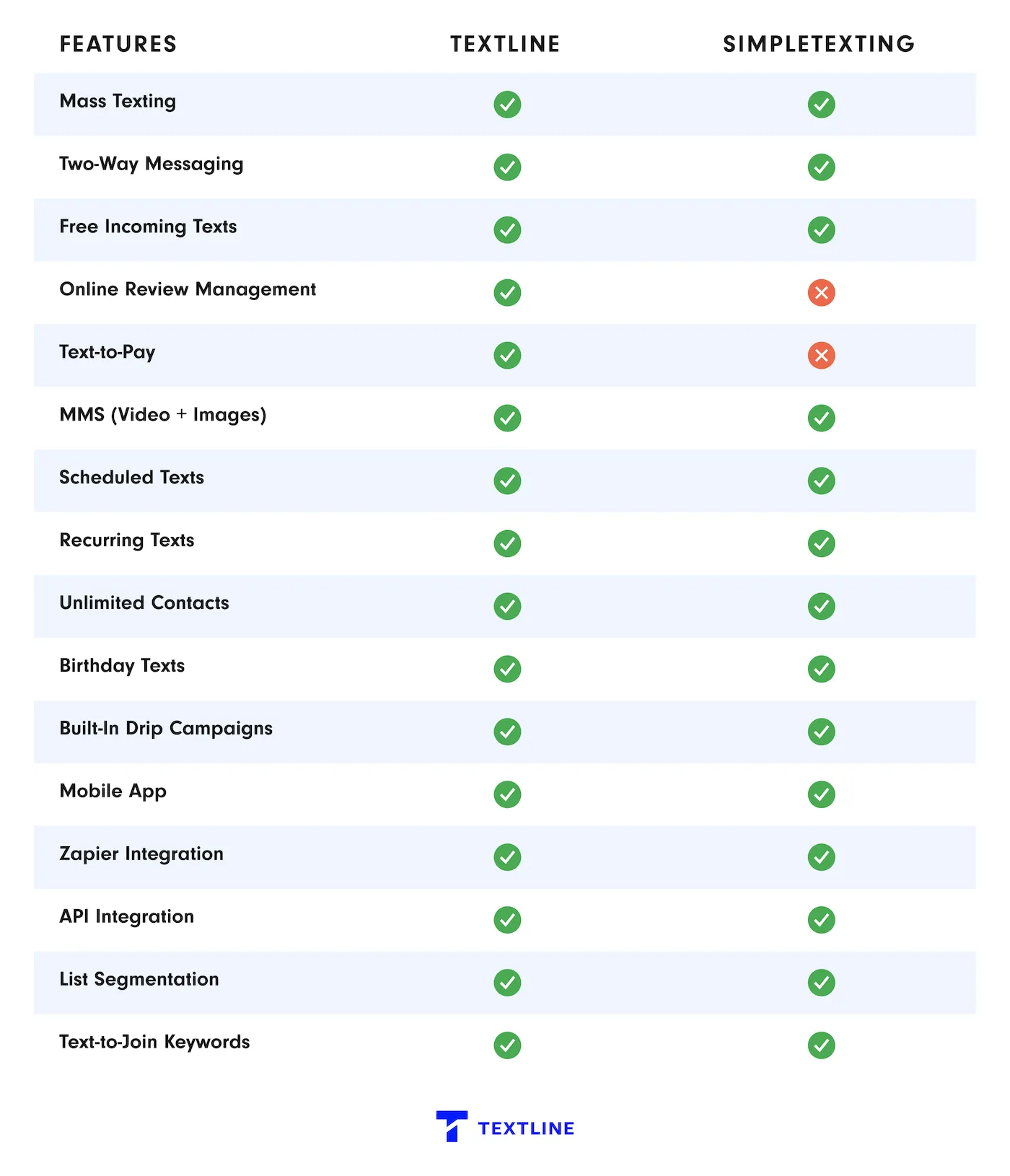
Now let’s compare Textline and SimpleTexting head-to-head. While both support business texting, they take different approaches—Textline emphasizes team collaboration, compliance, and shared inbox workflows, while SimpleTexting focuses on campaign-based messaging and ease of use for small teams.
These differences shape how each platform handles conversations, automation depth, and scalability, and they can directly affect which tool aligns best with your texting strategy.
<h3 id="user-sentiment">3. User Sentiment</h3>
Textline excels in team collaboration and compliance; SimpleTexting offers user-friendly marketing tools.
SimpleTexting gets strong marks for easy onboarding and a friendly UI, making it appealing for basic SMS use. Over time, some users report issues around refunds, compliance, and account access, which can limit long-term confidence as needs grow.
Textline’s reviews point to strong retention, driven by team collaboration, reliable support, and compliance-ready workflows. It’s often chosen when teams outgrow simple tools and need something more structured. If texting is a core part of operations, Textline is the platform users stick with.
"Textline simplifies communication"
“Textline enables instant and convenient communication that can happen anytime and anywhere, making it easier to stay connected without the need for calls or emails… They also make it simple to reach many people at once, which is useful for marketing or customer service, often at a lower cost than other methods. Plus, text messages generally have higher engagement rates since people tend to read and respond quickly, and texting works across almost all mobile devices, ensuring broad accessibility.”
— Daniela C., Logistics Coordinator (G2)
<h3 id="automation-workflows">4. Automation & Workflows</h3>
Textline provides advanced team automation; SimpleTexting focuses on marketing automation.
SimpleTexting’s automation is geared toward marketing speed, with AI-assisted copy, automated drip campaigns, and workflows that react to subscriber actions. That’s useful when the goal is to launch campaigns quickly with minimal setup, but it keeps automation focused on broadcasts rather than managing live conversations.
Textline’s automation is built for team-driven messaging, using clear rules, routing, scheduling, and saved replies that keep humans in control. This matters when conversations need context, handoffs, and accountability instead of auto-generated flows. If texting is part of daily operations and not just outbound marketing, Textline’s approach holds up better over time.
Crunchi improved support efficiency by adding automated SMS workflows to its email-only setup. With the Textline–Freshdesk integration, templates and announcements helped the team reach 6,800+ brand advocates while resolving inquiries faster at scale.
<h3 id="compliance-reliability">5. Compliance & Reliability</h3>
Textline leads with enterprise security; SimpleTexting offers basic compliance.
SimpleTexting covers the basics with standard TCPA/CAN-SPAM compliance and strong deliverability, which is fine for general SMS marketing. But for organizations handling sensitive data or operating under stricter requirements, that baseline approach has limits—making Textline the safer long-term choice.
This is where Textline clearly pulls ahead of SimpleTexting. Built for regulated use, Textline pairs HIPAA-ready compliance, enterprise security controls, and dependable delivery with workflows designed for teams that can’t afford mistakes or gray areas.
Dntl Bar elevated its spa-level dental experience by switching to HIPAA-compliant texting with Textline—helping the team respond faster, sync seamlessly with their EMR, and meet patients where 80% already prefer to communicate: text.
<h3 id="segmentation-targeting">6. Segmentation & Targeting</h3>
Textline enables precise team-based targeting; SimpleTexting offers marketing segmentation.
SimpleTexting is optimized for campaign-style segmentation, letting marketers group subscribers and send targeted blasts with longer messages. That works well when segmentation is mainly about who gets which promotion.
Textline is designed for operational targeting, where segments need to stay clean, reusable, and consistent across teams. With tags, saved searches, and merge fields, targeting stays explicit and easy to manage as conversations continue. If segmentation needs to support ongoing, human-led messaging instead of one-time sends, Textline is the more reliable setup.
Tumbleweed Tiny House Co. shortened a traditionally long sales cycle by shifting to personalized business texting—reaching leads at scale while keeping messages relevant to each stage of the journey. Text delivered a 22% response rate, enabled 300+ reach-outs per hour, and supported 1,000+ personalized lead conversations daily.
<h3 id="integration-ecosystem">7. Integration Ecosystem</h3>
Both platforms offer strong integrations; Textline adds team-focused tools.
SimpleTexting leans into scale with 1,000+ integrations and a flexible REST API, making it easy to plug SMS into a wide range of marketing and business tools. That breadth works well for teams that want lots of ready-made connections with minimal setup.
Textline stays more focused, prioritizing CRM and help desk integrations, plus no-code automation and healthcare-ready connections where needed. It’s fewer integrations, but they’re built around how teams actually manage conversations. For operational messaging, Textline’s ecosystem feels more purposeful.
“Feature-rich, easy integration—Textline exceeds expectations!”
“I love how many features Textline has. It has been incredibly helpful to have the ability to make mass announcements to our clients. Their Developer API is also very simple and effective and has made integrating our systems very easy. I 100% recommend Textline- it has been amazing!”
— Verified User in Staffing and Recruiting (G2)
<h3 id="conversion-tools">8. Conversion & List-Building Tools</h3>
Textline combines communication and conversion; SimpleTexting focuses on list growth.
SimpleTexting is built around growing lists and running campaigns, with strong tools for opt-ins, bulk uploads, keywords, and ready-made templates. That setup works well when the goal is to collect subscribers and push outbound messages, but it stays mostly at the marketing layer.
Textline is more about what happens after someone replies. With a shared team inbox, fast handoffs, internal notes, and conversation history, teams can move leads forward in real time. If conversion depends on speed, coordination, and actual back-and-forth, Textline connects communication and conversion more naturally.
Mathnasium improved lead-to-student outcomes by adding texting to its phone- and email-only outreach. Textline helped franchises reach harder-to-convert families, driving a 28% increase in conversion rate and faster engagement from leads who typically delay responses.
<h3 id="support">9. Support & Resources</h3>
Textline provides comprehensive support; SimpleTexting offers standard resources.
SimpleTexting covers the basics well, with live chat, phone support, and a solid help center available most days of the week. For everyday questions and standard SMS use, that setup generally gets the job done.
Textline feels more personal by design. You’re talking to real people during business hours, and on Pro plans there’s a dedicated CSM who actually knows your setup. When something breaks or gets messy, that kind of ownership makes a difference—and it’s usually why teams stick with Textline once texting becomes important to the business.
"Textline is a very helpful tool for communication and organization with my clients."
“I like how easy it is to use and how efficient it is. It has increased my sales which has made our company more money! It makes communication between me and my clients so easy. I can send texts, links, and photos with no issues and zero lagging… It made switching over all our clients very simple. With any questions or concerns the support team is already ready to help.”
— Emma S., Licensed Insurance Producer (G2)
<h2 id="people">What People Are Saying About Textline…</h2>
“Textline is the best texting software for medical clinic”
“Textline allows us to communicate with our patients even when our phone systems have been down and they have been down a lot. The tagging features allow us to contact specific patient demographics and keep constant communication flowing. This system even allowed us to integrate with our custom software via an API. What can I say, except that I love it!”
— Elias R., Owner (G2)
“We love Textline!”
“What I like most is the ease of scheduling text messages. I can set my texts to go out and don't have to stress about getting them out at a certain time and being tied to my computer. We use Textline weekly so it helps to be able to schedule them. I also like how we can use our own phone number! This has been huge in our customer service!”
—Stevie D., Director (G2)
“I have been using Textline for about four years for my business…”
“I love how Textline facilitates connecting with my customers effectively by notifying them weekly about deliveries and pickups, as well as when they should place or modify their orders. This feature significantly enhances my customer interaction and ensures smooth communication.”
— Matthew P., Owner (G2)
<h2 id="keys">Key Considerations When Choosing an SMS Platform</h2>
The right SMS platform for your business depends on several key factors. It’s important to weigh these before choosing a provider:
- Use case fit. Whether you’re sending appointment reminders, internal updates, or customer support messages, the platform should support real-time, two-way communication.
- Ease of use. A clean inbox, simple tools, and fast setup help teams respond quickly and stay consistent without extra training.
- Cost. Look beyond base pricing. Message volume, user seats, and included features all affect your total cost over time.
- Integrations. The platform should connect easily with the systems your team already relies on.
- Customer support. Helpful onboarding and responsive support make day-to-day messaging smoother and prevent avoidable issues.
- Compliance. Built-in guidance for TCPA rules, 10DLC registration, and opt-in management is essential for compliant business texting.
<h2 id="final">Final Verdict: Textline vs. SimpleTexting — Who Wins?</h2>
If your business operates in healthcare or other compliance-sensitive environments, Textline is often the better fit when you need security-forward controls.
Textline promotes HIPAA-oriented workflows and states it earned a patent (2021) tied to its consent feature for healthcare texting. It also positions itself as SOC 2 compliant and provides a SOC 3 report, with a SOC 2 report available on request.
Beyond compliance, Textline emphasizes team-based communication, designed for shared inbox workflows where multiple staff coordinate on conversations.
SimpleTexting is a strong option for straightforward SMS marketing, especially if you want published pricing and plan flexibility like rollover credits. It’s well-suited for promotional messaging, list growth, and basic two-way texting without heavier governance requirements.
Choose Textline if you need:
- HIPAA-oriented texting workflows and compliance-forward security positioning
- Evidence-backed security posture such as SOC 2 compliance language / SOC reports
- A team workflow centered on shared inbox coordination
Choose SimpleTexting if you need:
- Published pricing with clear plan options
- Rollover credits for lighter or variable monthly volume
- SMS marketing-focused features and simple setup
Ultimately, Textline is positioned for organizations that treat texting as a controlled, compliance-aware communication channel, while SimpleTexting is positioned for teams prioritizing marketing simplicity and predictable self-serve pricing.
More Head-to-Head Comparisons
- Textline vs. OhMD
- Textline vs. Podium
- Textline vs. ClickSend
- Textline vs. SlickText
- Textline vs. TextMagic
- Textline vs. HeyMarket
- Textline vs. TigerConnect
Try Textline
Textline highlights SOC 2 certification and a patented HIPAA consent flow for teams that can’t treat texting like a casual channel.
Create a free Textline account. No credit card required.