




Trying to choose between Textline and TextMagic? We put both SMS business communication platforms head-to-head across key categories: features, automation, pricing, integrations, and ease of use – all here to help you decide which one fits your business goals best.
Choosing the right SMS software is all about aligning to your business's needs and with your communications strategy. With so many tools on the market, it's easy to feel overwhelmed, especially when every platform claims to be "the best."
While we're part of the Textline team, this comparison comes from the perspective of industry professionals who've spent countless hours evaluating SMS platforms. We're here to share the pros, cons, and tradeoffs of each tool to help you make a clear, confident decision that's best for your business.
- TL;DR: Side-by-Side Feature Comparison
- Textline vs. TextMagic In-Depth Comparisons
- User Reviews: What People Are Saying
- Key Considerations When Choosing an SMS Platform
- Final Verdict: Textline vs. TextMagic — Who Wins?
<h2 id="tldr">TL;DR: Textline vs TextMagic Side-by-Side Feature Comparison</h2>
Disclaimer: The features and pricing mentioned are accurate as of December 2025 and may have changed since publication.
Before we dive into a side-by-side comparison, let's take a quick look at what each platform is all about.
Textline is a team-based business texting platform designed around shared inbox collaboration. It brings SMS/MMS and website web chat into a single workspace so multiple users can manage conversations together, with a focus on structured workflows and compliance-oriented messaging for regulated organizations.
Textmagic is a business messaging platform centered on SMS-based communication, with tools for two-way texting, contact management, and messaging at scale. It is positioned for businesses that want a flexible, channel-agnostic messaging service with integrations to support broader communication needs.
“Textline is hands down the best tool we’ve used for team communication with customers.”
“We’ve tested several platforms, but none have matched how simple and effective Textline is. It lets us text customers quickly, keep everything organized, and have multiple team members jump into conversations when needed… What we really like is that it feels personal—our clients appreciate how fast we can respond and how easy it is to reach us. The shared inbox and internal notes make teamwork smooth, and we don’t miss messages anymore.”
— Santiago C., Track and trace specialist (G2)
<h2 id="in-depth">Textline vs. TextMagic In-Depth Comparisons</h2>
<h3 id="pricing-breakdown">1. Pricing Breakdown</h3>
Textline offers enterprise-focused custom pricing; TextMagic provides transparent pay-per-message rates.
TextMagic is built for cost flexibility. You buy credits, send messages, and pay only for what you use—no per-user tiers and no long-term commitment. This works well for teams with unpredictable or seasonal volume, but costs can fluctuate month to month, especially once numbers, 10DLC, or higher send volume are added.
Textline prioritizes predictability over raw flexibility. Plans bundle message credits into a monthly subscription, making it easier to forecast spend as teams scale. The tradeoff is less freedom for ultra-low or sporadic usage, but more stable pricing for teams texting consistently.
“Textline's affordability and straightforwardness are major aspects that would make me choose it again…”
‘Textline’s combination of ease and affordability makes it a practical solution for my business needs. With a satisfaction level of 10 out of 10, I find Textline to be a service worthy of recommendation.”
<h3 id="core-features">2. Core Messaging Features</h3>
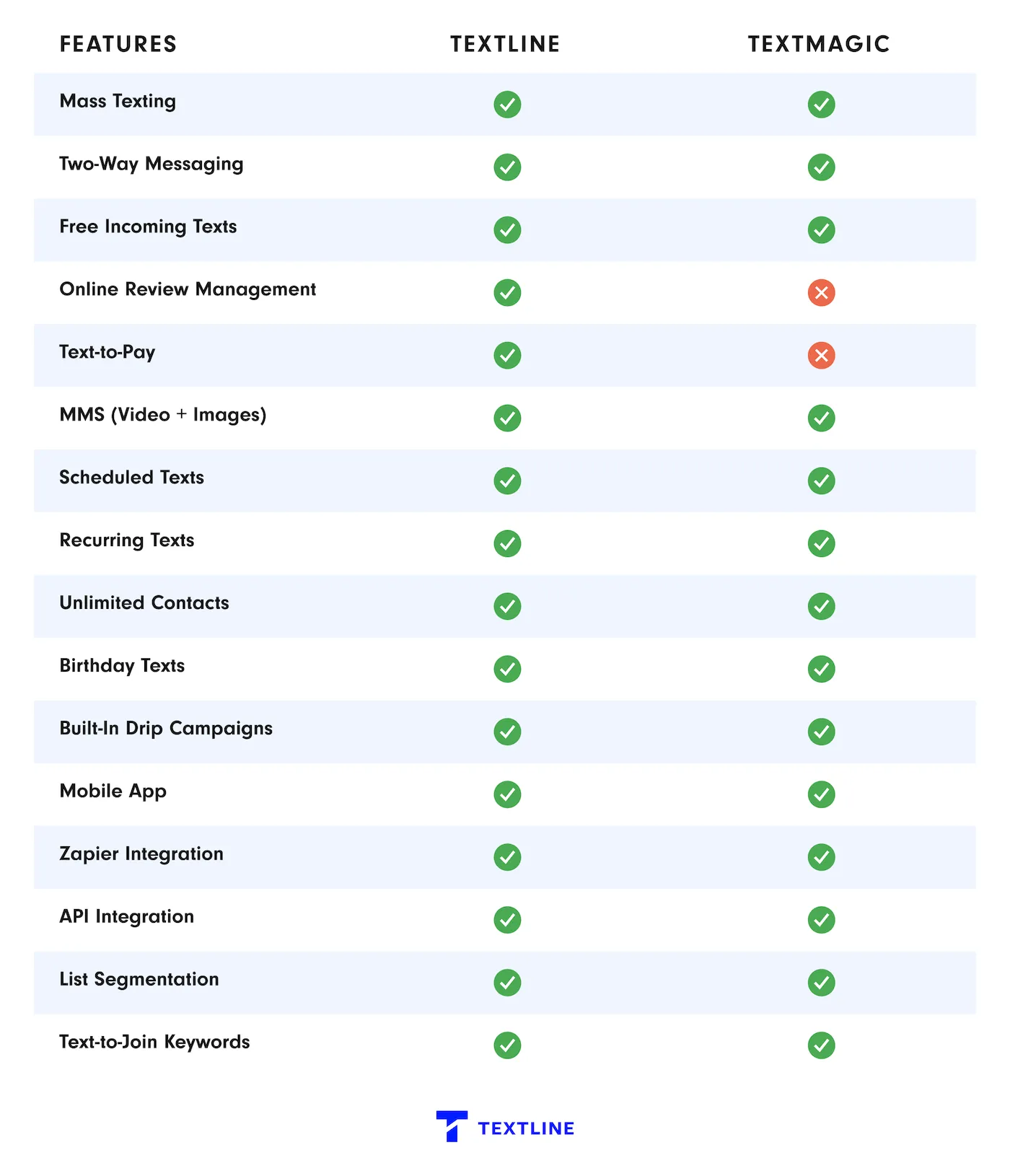
Now let’s compare Textline and Textmagic head-to-head. Both support two-way business messaging, but they take different approaches: Textline focuses on secure, compliance-driven team texting, while Textmagic emphasizes a flexible, usage-based messaging service designed for broad business communication.
These differences affect how teams collaborate, manage risk, and choose pricing models that align with their messaging needs.
<h3 id="user-sentiment">3. User Sentiment</h3>
Textline excels in team collaboration and compliance; TextMagic offers broader communication channels.
TextMagic earns praise for flexibility and channel range. Users like the ability to mix SMS with email-to-SMS and API-driven workflows, which makes it appealing for more technical or multi-channel use cases. That flexibility comes with a bit more setup and cost variability, especially as usage grows.
Textline stands out for day-to-day reliability and teamwork. Reviews consistently point to smooth onboarding, fast human support, and a shared inbox that makes collaboration easy. It’s especially valued by teams in regulated environments, where compliance and consistency matter more than flashy features.
"Textline simplifies communication"
“Textline enables instant and convenient communication that can happen anytime and anywhere, making it easier to stay connected without the need for calls or emails… They also make it simple to reach many people at once, which is useful for marketing or customer service, often at a lower cost than other methods. Plus, text messages generally have higher engagement rates since people tend to read and respond quickly, and texting works across almost all mobile devices, ensuring broad accessibility.”
— Daniela C., Logistics Coordinator (G2)
<h3 id="automation-workflows">4. Automation & Workflows</h3>
Textline provides advanced team-based automation; TextMagic focuses on multi-channel workflow integration
TextMagic leans more toward system-driven workflows. Automation is built around keywords, autoresponders, and multi-step flows that can span SMS and email. It’s flexible, especially for inbound triggers or recurring sends, but most automation lives around lists and flows rather than live team conversations.
Textline treats automation as support for people, not a replacement for them. Rules handle the repetitive stuff—routing, replies, scheduling—so teams can stay responsive without losing control of conversations. Everything stays predictable, visible, and easy to adjust inside a shared inbox.
Crunchi improved support efficiency by adding automated SMS workflows to its email-only setup. With the Textline–Freshdesk integration, templates and announcements helped the team reach 6,800+ brand advocates while resolving inquiries faster at scale.
<h3 id="compliance-reliability">5. Compliance & Reliability</h3>
Textline leads in healthcare compliance; TextMagic provides standard business compliance.
TextMagic leans toward global business messaging, with strong delivery reporting, public status visibility, and GDPR-aligned controls. It’s reliable and transparent, but not designed as a healthcare-first platform.
Textline is built for regulated environments, especially healthcare, where consent, access controls, and data handling need to be airtight and consistent in day-to-day use. Reliability here is about operational trust, not just uptime metrics.
Dntl Bar elevated its spa-level dental experience by switching to HIPAA-compliant texting with Textline—helping the team respond faster, sync seamlessly with their EMR, and meet patients where 80% already prefer to communicate: text.
<h3 id="segmentation-targeting">6. Segmentation & Targeting</h3>
Textline offers advanced team-based targeting; TextMagic provides comprehensive contact management.
TextMagic approaches segmentation from a contact-database perspective. It gives you more structure around contact profiles, dynamic fields, and list hygiene, which is useful when messaging is driven by stored attributes and bulk list management rather than live conversations.
Textline treats targeting as an extension of team conversations. Segments are built to stay reusable inside a shared inbox, making it easier for multiple teammates to act on the same audiences without constantly rebuilding lists. It works best when targeting supports ongoing, human-led communication, not just one-off sends.
Tumbleweed Tiny House Co. shortened a traditionally long sales cycle by shifting to personalized business texting—reaching leads at scale while keeping messages relevant to each stage of the journey. Text delivered a 22% response rate, enabled 300+ reach-outs per hour, and supported 1,000+ personalized lead conversations daily.
<h3 id="integration-ecosystem">7. Integration Ecosystem</h3>
Textline specializes in business and healthcare integrations; TextMagic offers broader multi-channel connectivity.
TextMagic takes a more flexible, build-it-yourself approach. It leans on APIs and Zapier to connect SMS into broader, multi-channel stacks. That gives technical teams more freedom, but also means setup and maintenance live outside the core product.
Textline is built for teams that live in CRMs and help desks. Its integrations are designed to feel native, so texting fits directly into sales and support workflows without extra glue. That matters when reliability, shared ownership, and compliance are more important than wiring together lots of tools.
“Feature-rich, easy integration—Textline exceeds expectations!”
“I love how many features Textline has. It has been incredibly helpful to have the ability to make mass announcements to our clients. Their Developer API is also very simple and effective and has made integrating our systems very easy. I 100% recommend Textline- it has been amazing!”
— Verified User in Staffing and Recruiting (G2)
<h3 id="conversion-tools">8. Conversion & List-Building Tools</h3>
Textline excels in team-based conversion; TextMagic offers comprehensive lead capture.
TextMagic focuses on capturing and routing leads. Its strength is in opt-in forms, keywords, website widgets, and automation rules that help teams collect contacts and start conversations at scale. The tradeoff is that follow-up tends to be more rules-driven and less collaborative, which can feel rigid once a conversation needs human handoffs or team context.
Textline takes a conversation-first approach. Instead of optimizing for lead capture, it’s built to help teams respond quickly, coordinate in a shared inbox, and manage ongoing one-to-one conversations. You get less funnel-style automation, but more control where real customer interactions actually happen.
“Feature-rich, easy integration—Textline exceeds expectations!”
“I love how many features Textline has. It has been incredibly helpful to have the ability to make mass announcements to our clients. Their Developer API is also very simple and effective and has made integrating our systems very easy. I 100% recommend Textline- it has been amazing!”
— Verified User in Staffing and Recruiting (G2)
<h3 id="support">9. Support & Resources</h3>
Textline provides comprehensive human support; TextMagic offers self-service resources.
TextMagic is built for teams that are comfortable being mostly self-directed. Support is always available through email, tickets, live chat, and a well-documented Help Center and API docs. It works well if your team prefers looking things up, following guides, and handling setup independently.
Textline takes a more hands-on approach. Support is easy to reach during business hours through phone, chat, SMS, and email, with a dedicated CSM on higher plans. It’s especially helpful for teams that want quick answers, guidance during setup, and real people involved when workflows or conversations need attention.
"Textline is a very helpful tool for communication and organization with my clients."
“I like how easy it is to use and how efficient it is. It has increased my sales which has made our company more money! It makes communication between me and my clients so easy. I can send texts, links, and photos with no issues and zero lagging… It made switching over all our clients very simple. With any questions or concerns the support team is already ready to help.”
— Emma S., Licensed Insurance Producer (G2)
<h2 id="people">What People Are Saying About Textline…</h2>
“Textline is the best texting software for medical clinic”
“Textline allows us to communicate with our patients even when our phone systems have been down and they have been down a lot. The tagging features allow us to contact specific patient demographics and keep constant communication flowing. This system even allowed us to integrate with our custom software via an API. What can I say, except that I love it!”
— Elias R., Owner (G2)
“We love Textline!”
“What I like most is the ease of scheduling text messages. I can set my texts to go out and don't have to stress about getting them out at a certain time and being tied to my computer. We use Textline weekly so it helps to be able to schedule them. I also like how we can use our own phone number! This has been huge in our customer service!”
—Stevie D., Director (G2)
“I have been using Textline for about four years for my business…”
“I love how Textline facilitates connecting with my customers effectively by notifying them weekly about deliveries and pickups, as well as when they should place or modify their orders. This feature significantly enhances my customer interaction and ensures smooth communication.”
— Matthew P., Owner (G2)
<h2 id="keys">Key Considerations When Choosing an SMS Platform</h2>
Choosing the best SMS platform means looking at more than just features or pricing. Before deciding, consider these important factors:
- Use case fit. The platform should match how you communicate, from time-sensitive alerts to customer service updates.
- Ease of use. A clean inbox, simple tools, and fast setup make it easier for teams to adopt and use the platform daily.
- Cost. Monthly fees don’t tell the full story. Message limits, overages, user fees, and features all impact total cost.
- Integrations. Make sure the platform works with the systems your team already relies on.
- Customer support. Quick, knowledgeable support helps prevent issues and keeps messaging running smoothly.
- Compliance. Built-in guidance for TCPA rules, 10DLC registration, and opt-in management is essential.
<h2 id="final">Final Verdict: Textline vs. TextMagic — Who Wins?</h2>
If your business prioritizes team collaboration, compliance, and secure communication, Textline is built for that need. It goes beyond basic SMS by focusing on shared inbox workflows, team coordination tools, and compliance-oriented messaging commonly required in healthcare, field services, and other regulated environments.
Textline supports HIPAA-focused use cases and SOC 2–aligned security practices, with collaboration features like internal notes (Whispers), routing, and group messaging for organizations with complex, multi-user communication needs.
Textmagic is better suited for businesses that want flexible, multi-channel messaging, combining SMS with options like email-to-SMS and usage-based pricing. This works well for teams with variable messaging volume or email-centric workflows.
Bottom line: choose Textline for secure, compliant, team-based texting; choose Textmagic for flexible, multi-channel business messaging without industry-specific compliance requirements.
More Head-to-Head Comparisons
- Textline vs. OhMD
- Textline vs. Podium
- Textline vs. ClickSend
- Textline vs. SimpleTexting
- Textline vs. SlickText
- Textline vs. HeyMarket
- Textline vs. TigerConnect
Try Textline
Textline highlights SOC 2 certification and a patented HIPAA consent flow for teams that can’t treat texting like a casual channel.
Create a free Textline account. No credit card required.